

Chapter Outline
Chapter 8: Templates, Forms, and Validation
In this chapter, you will learn:
- How Django handles HTML templates with its template engine.
- How to render dynamic data into templates.
- How to build and process forms in Django.
- How Django enforces CSRF protection.
- How to add validation for user input.
By the end, our Blog app will let users create posts through a form and see them rendered on a page.
8.1 Templates
Django templates form the presentation layer of a Django application, responsible for transforming data from views into HTML that is delivered to the browser. Templates use the Django Template Language (DTL), a simple yet powerful syntax that supports variable interpolation, control structures (like loops and conditionals), template inheritance, and filters for formatting data. This system encourages clean separation between logic and presentation: views collect and prepare the data, while templates define how that data should appear to the user.
Django’s template engine also supports reusable components through template inheritance, allowing you to define base layouts and override specific blocks in child templates. This makes it easy to maintain consistent structure across pages while varying content as needed. Overall, Django templates provide a flexible and structured way to generate dynamic HTML without mixing Python code directly into your markup.
8.1.1 Setting Up Templates
Create a folder for templates:
bashsrc/├── apps/│ ├── blog/│ │ └── templates/│ │ └── blog/│ │ └── home.html
Inside home.html:
src/apps/blog/templates/blog/home.html<!DOCTYPE html><html lang="en"><head><meta charset="UTF-8"><title>Django Blog</title></head><body><h1>Welcome to the Blog</h1><ul>{% for post in posts %}<li>{{ post.title }} - {{ post.content }}</li>{% empty %}<li>No posts yet!</li>{% endfor %}</ul></body></html>
8.1.2 Use Template in View
Update the view to use templates:
src/apps/blog/views.py1from django.shortcuts import render23# Temporary storage for posts4POSTS = []56def home(request):7 """Render homepage with all blog posts."""8 return render(request, "blog/home.html", {"posts": POSTS})
8.1.3 Launch the App
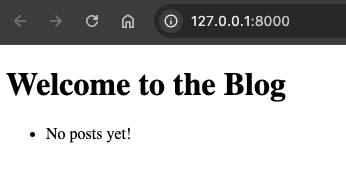
Run the following in the terminal:
bashpoetry run python manage.py runserver
Now visit http://127.0.0.1:8000/
8.2 Forms
Django forms provide a high-level abstraction for handling user input safely and consistently, bridging the gap between HTML form fields, server-side validation, and database interactions. A Django form defines the structure of expected input—fields, types, labels, and constraints—and automatically generates both the HTML form elements and the server-side validation logic.
When a form is submitted, Django processes the incoming data, validates it according to the rules you’ve defined, and gives you a clean Python object representing the validated values. This eliminates the need to manually parse request data or write repetitive validation code.
Django also offers ModelForms, which tie forms directly to database models, allowing you to create or update records with minimal boilerplate. By centralizing validation, error reporting, and rendering, Django forms encourage secure, maintainable input handling and help ensure that user-facing forms remain consistent across your application.
8.2.1 Create Post Form
Django provides a forms module. Create a form for new posts:
src/apps/blog/forms.py1from django import forms23class PostForm(forms.Form):4 """Form for creating blog posts."""56 title = forms.CharField(max_length=100, required=True)7 content = forms.CharField(widget=forms.Textarea, required=True)
8.2.2 Form Validations
PostForm defines two fields; title and content.
Django automatically applies several built-in validations when you submit data through this form:
- Required field validation:
Both fields use
required=True, so Django checks that each field is present in the submitted POST data and is not an empty string. If missing, the form will produce an error like:- “This field is required.”
- Type and basic sanitization validation:
CharFieldensures the submitted data is treated as a string. Django will also trim whitespace and standardize the value (e.g., convertingNoneto"") before validation. - Length validation (
max_length=100on title): Django checks thattitleis no longer than 100 characters, generating an error message if the limit is exceeded.
8.2.3 Form Templates
Django form templates are the bridge between Django’s form objects and the HTML presented to users, allowing you to render form fields, validation errors, and user input in a structured, customizable way.
While Django forms can automatically generate raw HTML using helpers like {{ form.as_p }} or {{ form.as_table }}, most real-world applications use dedicated templates to control layout, styling, and accessibility.
In a form template, each field can be rendered individually—giving you full control over labels, input widgets, error messages, and surrounding markup—while still relying on Django’s form object for validation and data handling. Template tags such as {% csrf_token %}, {% for field in form %}, and {% if field.errors %} make it easy to integrate forms into your page while maintaining security and usability.
By separating form logic from presentation, Django form templates let you produce polished, user-friendly interfaces without duplicating backend form logic in the frontend.
8.2.4 Create Post Form Template
The following form template is used for blog post creation.
src/apps/blog/templates/blog/create_post.html<!DOCTYPE html><html lang="en"><head><meta charset="UTF-8"><title>Create Post</title></head><body><h1>Create a New Post</h1><form method="post">{% csrf_token %}{{ form.as_p }}<button type="submit">Save</button></form><a href="{% url 'home' %}">Back to Home</a></body></html>
Explanation:
{{ form.as_p }}renders form fields wrapped in<p>.{% csrf_token %}adds hidden security token for CSRF protection.
8.2.5 Create Post View
src/apps/blog/views.py1from django.shortcuts import redirect2from .forms import PostForm34def create_post(request):5 """Handle GET (show form) and POST (process form)."""6 if request.method == "POST":7 form = PostForm(request.POST)8 if form.is_valid():9 POSTS.append(form.cleaned_data)10 return redirect("home")11 else:12 form = PostForm()13 return render(request, "blog/create_post.html", {"form": form})
When create_post() view function in voked to processes a POST request. the new blog post entered by the user and appends it to the POST list. In a later chapter, we'll examine how this data is saved into a database. For all other request types, the view renders the create_post.html form template.
8.2.6 Link Create Post View
Let's update the homepage template, so that it links to the create_post view.
src/apps/blog/templates/blog/home.html<!DOCTYPE html><html lang="en"><head><meta charset="UTF-8"><title>Django Blog</title></head><body><h1>Welcome to the Blog</h1><ul>{% for post in posts %}<li>{{ post.title }} - {{ post.content }}</li>{% empty %}<li>No posts yet!</li>{% endfor %}</ul><a href="{% url 'create_post' %}">Create a New Post</a></body></html>
8.2.7 Update URLs
Let's add the path create/ to urls.py so that it is associated with the view create_post.
src/apps/blog/urls.py1from django.urls import path2from . import views34urlpatterns = [5 path("", views.home, name="home"),6 path("create/", views.create_post, name="create_post"),7]
8.2.8 Add New Posts
Click on the Create a New Post link that appears on the homepage now. The following form should render, that'd allow you to add a new blog post:

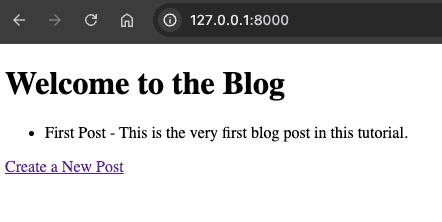
Enter some data, and click Save.
Now the newly saved post should appear on the list on the homepage:
8.3 Testing Templates and Forms
Let's update the app's view tests to incorporate the new features:
tests/apps/blog/test_views.py1import pytest2from django.test import Client3from django.urls import reverse456@pytest.mark.django_db7def test_home_page_renders():8 client = Client()9 response = client.get(reverse("home"))10 assert response.status_code == 20011 assert "Welcome to the Blog" in response.content.decode()121314@pytest.mark.django_db15def test_create_post_form():16 client = Client()17 response = client.post(reverse("create_post"), {"title": "My First Post", "content": "Hello"})18 assert response.status_code == 302 # Redirect after success1920 response = client.get(reverse("home"))21 body = response.content.decode()22 assert "My First Post" in body23 assert "Hello" in body
8.4 Template & Form Flow
8.5 Chapter Summary
In this chapter we introduced Django templates, forms, and form validations. We implemented two templates to display the blog posts on the homepage, and a form to enter a new blog post. The validated new post is then saved into a list representing an in-memory database.
In the next chapter we'll learn about how to save the user's posts into a database using Django ORM.
8.6 Further Reading
Check your understanding
Test your knowledge of Templates, Forms, and Validation in Django